Well, Septic, and Short-Term Rental Forms
How to Apply and Pay
Submitting your Well and/or Septic project or inspection form and payment can be done in a few easy steps.
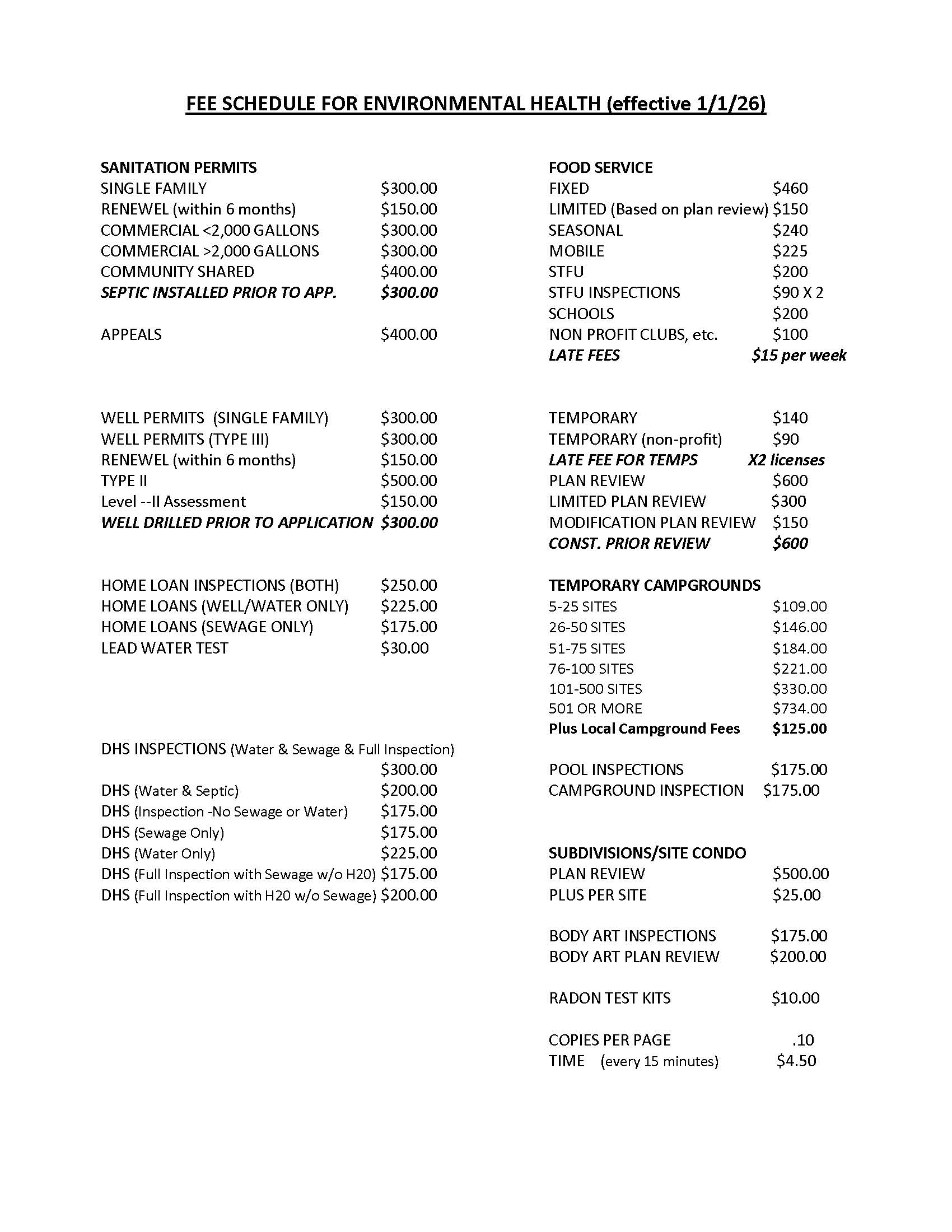
Review 2026 Fee Schedule
Find the fee related to the inspection you need.
Fill Out The Form
This form needs a stable internet connection. If it stalls or doesn’t submit, please call (269) 621-3143 at ext.2006 for help.
Instructions: Fill in all details about your inspection request. When you click Submit, your information will be sent to the correct office and a PDF copy will be created for your records.
Required: Your site drawing must show how far the well is from the nearest contamination source.
Application for WELL and/or SEPTIC Project or Inspection
Choose your PROJECT OR INSPECTION TYPE(S) and take note of the ASSOCIATED FEES. Look for the * as some services will require a Scale Site Drawing, including dimensions and all possible sources of contamination be provided.
Next Step: Click the Submit button above and a printable version of your application will be emailed. If you are having difficulties submitting your application, contact EH at (269) 621-3143 at ext. 2006.
Submit Payment
We offer several ways to pay.
Pay Online
You can pay your permit fee easily through our secure online payment portal.
Mail or In-Person Payment
You can send your payment to the Van Buren/Cass District Health Department at either of these locations:
Cass County Office:
302 S. Front Street, Dowagiac, MI 49047
Van Buren County Office:
260 South Street, Lawrence, MI 49064
You can also print your application and bring your payment to one of the offices listed above.